Friday, May 28, 2010

Meeting in Second Life

I've been doing a little research for a colleague for a grant they are working on. The idea is to have townhall meetings via SecondLife. Unfortunately, the target audience is FAR from millenials, so I don't really know how it's gonna work out.


Here's an interesting blog post I found which is confirming my fears:


Real Business Meetings in 3D Virtual Worlds Won't Go Mainstream For Many Years, Platform Evangelist Predicts


Real world businesses won't widely use virtual worlds like Second Life to hold meetings for quite some time -- that's the prediction of Erica Driver ofThinkBalm, a consultancy firm which specializes in the use of Second Life and other virtual worlds for business applications. (I wrote about one of their innovative SL applicationsin 2009.) Only last January, Erica predicted that 2013 was the year when mainstream adoption of virtual meetings would take hold. Now, however, as she tells Roland Legrand of Mixed Realities, she considers the 2013 prediction “a little bit aggressive." Since then, as Erica expands on Think Balm's blog, there's been a number of setbacks for enterprise use of virtual worlds: Oracle stopping financing its Project Wonderland virtual work platform, for instance, and "[k]ey roles on Linden Lab’s enterprise team were folded into the broader organization and several folks on the enterprise team have moved on".


I still think Second Life could be awesome for meetings though! Check out this screencast of me wandering around SL looking for meeting rooms:)


Wednesday, May 26, 2010

Methods for Blended Learning

Margaret Driscoll of IBM write a great article on examples of various methods for blended learning:


Here's the list, see the article for details:


1. Put the assessment online.


2. Follow up with a community of practice.


3. Make reference materials available.


4. Deliver pre-work online.


5. Provide online office hours.


6. Use mentoring/coaching as a tool.


7. Provide job-aids.


8. Access experts.


9. Create a "lifeline".


10. Maximize e-mail and messaging.


I always say that if you teach online the same way you teach face-to-face, then you're not really teaching online. How does your style change when you tech online.


Monday, May 24, 2010

Mac Applications for Educators

Dru Ryan presented this to a group of educators at the LEAGUE conference in Baltimore. There were about 50 MAc enthusiasts in the room and the topic was well received.

Mac Applications for Educators


View more presentations from druryan.


Thursday, May 20, 2010

Engagement in Technology

According to a Thompson Netg job security study in 2002, blended learning yielded better results than online learning alone.


They point out:


  1. Blended Learning performance was 30% more accurate than e-learning alone


  2. Blended learning performance on the real world task was 41 percent faster than e-learning alone


  3. Blended learning performance was 159% more accurate than no training


  4. E-learning was 99% more accurate than no training


The results of the study say scenario-based exercises are the most effective for face to face and online materials.


For more on Blended Learning, check out the Brandon Hall Report: The Real Story: Blended Learning.


Tuesday, May 18, 2010

Google Reader .. a screencast

A little screencast I made for Google reader. I learned that zooming is important after this one.


Thursday, May 13, 2010

Personalized Learning

According to a Brandon Hall report on Blended Learning:


"Design and development of blended learning requires a holistic approach involving modern pedagogy, learner needs and expectations, and technology.... A key design aspect of blended learning should be aimed at personalized learning with a human or virtual guide to direct and support the individual learner."


Citing research by Sharpe ("Success Factors for Blended Learning"), the following design factors were highlighted:


  1. Analysis of successful and successful features of the course content (including learner feedback)


  2. Undertaking the design as a team, ensuring staff members have the time to properly integrate face to face and online material


  3. Designs that make explicit their underlying principles -- these could be established pedagogical principles, active learning, repetition and elaboration, prompt and frequent feedback, or course outcomes


  4. Developing the course iteratively over a number of years


  5. Help students develop conceptions of the learning process


  6. Disseminate and communicate the results of evaluations.


So how does your blended course stack up? Comments please:)


Tuesday, May 11, 2010

CTL Blended Learning Blog

The CTL has attempted to use blogs to convey information about fellowships and to publicize activities . . . the blended learning blog was created to share information about blended learning. It was the first WordPress blog for us, we use Blogger mostly, but it turned out well.


View the blog here


Screen shot 2010-04-21 at 3.20.40 AM.png


Monday, May 10, 2010

What does a high quality online course look like?

An excellent site (from California State University) for assessing online learning. Check it out:


[taken from]


This site is designed to answer the question being asked: What does a high quality online course look like? It is our hope that instructors and instructional designers will use this site to learn more about the Rubric for Online Instruction, and be able to view examples of exemplary courses that instructors have done in implementing the different components of the rubric.


Screen shot 2010-04-25 at 8.23.51 PM.png


Friday, May 7, 2010

Using Google Docs To Grade Essays

I rarely touch paper when I grade anymore. I typically will hand grade the first assignment (even scanning in papers if needed) because I think there's something special about seeing handwriting on an essay. However, most other assessments are handled electronically.


I've used all types of learning management systems and they all require you to download documents (word, PPT, Excel) and then edit them on your machine. Well, I don't trust students and their often virus-laced files and I've been looking for a workaround for a while.


Google Docs to the rescue! [View video on Google docs]Screen shot 2010-04-28 at 6.43.21 PM.png . Google Docs allows you to manipulate Microsoft Office files on the web, making your grading portable.


More than that, you can even share the document with the student to continue the conversation on a paper in a collaborative manner.


So here's my process:


  1. Download the papers from the LMS. Every LMS I've encountered provides an option to download files and will typically give you a ZIP file with all of the documents. 2010-04-28_18.47.01.jpg


  2. Go to Google Docs and import the files [not sure how?] into a FOLDER. It's important to keep the assignments grouped. Here's what it looks like for me: google.png


  3. Then using Google's Comment and Footnote features to edit the document.


  4. Once complete, you have two options (I typically do the latter):


    • Share the document with the student by providing a URL which they can use to access it


    • Screen shot 2010-04-28 at 7.03.08 PM.png


    • Download the files, en masse, as individual PDF's, and then upload each student's graded essay back to the LMS. [this is also a good way to backup your Google Docs]


    • Screen shot 2010-04-27 at 7.58.09 AM.png  


I know I probably left out a few steps, but I covered the BIGGIES. Make grading work for you. Google Docs to the rescue!


Thursday, May 6, 2010

Unified Learning and Collaboration:

Meeting the Needs of Education and Training in the 21st Century

Elluminate, though pushing its ware's in the process, provides an interesting paradigm for online learning.


http://www.elluminate.com/Products/Unified_Learning/?id=305/ Screen shot 2010-04-20 at 2.39.09 PM.png


Wednesday, April 28, 2010

Focus on Faculty Newsletter

Each semester, the Center for Teaching and Learning puts out a newsletter. Below is the Spring 2010 version. Check it out!


FOFSpring_2010

Tuesday, April 27, 2010

Visual Communication – Timelines, Screencasts, Concept Maps and More

This workshop discusses ways to visually share information with students.

Thursday, April 22, 2010

Getting to the CTL Blog

This screensteps module will guide you to the CTL Blog on MyMC

Go to MyMC
media_1271645733907.png
Logon to [http:mymc.montgomerycollege.edu] to sign-in

Choose the FACULTY Tab
media_1271645779925.png

Click on the faculty tab to access content.

Find the CTL Blog block
media_1271645848546.png
Scroll down on the page to access the CTL blog. Click on any of the stories to access the full blog.
... and now the CTL blog
media_1271645864066.png

You can also access the blog directly at mcctl.blogspot.com

Tuesday, April 20, 2010

CTL Professional Development Series II: Teaching Our Digital Natives

The Center for Teaching and Learning's second Professional Development Series for the 2009-2010 academic year has been rescheduled for May 1, at the Germantown Campus, Goldenrod Building, from 8:30 a.m. - 1 p.m. This event will offer part time faculty five professional development credit hours that can be used to increase rank and/or salary and full time faculty the opportunity to meet their professional development goals as well.

Teaching Our Digital Natives will focus on tools that can facilitate instruction. Many of the workshops are hands on or interactive. Learn about and how to use Smart Instructor Work Stations, Library Technology Resources, Banner for faculty, Web 2.0 tools, and much more.


These offerings are sure to enhance your instruction and support our mission to support students' success and change students' lives.


For more information, contact Professor Windy Jefferson-Jackson at windy.jefferson-jackson@montgomerycollege.edu or 240-567-1383.


To request accommodations for a disability, please contact June Clarke, CTL, at 240-567-2001.


Monday, April 19, 2010

Blended Learning Blogs

I'm facilitating a Blended Learning fellowship for the college. Fellows were asked to maintain blogs throughout the second semester. I figured online educators should be doing online activities:) Here are a couple of them.
(taken from the college's online newspaper)
All this week, we will be highlighting faculty blogs from the Blended Learning Fellowship facilitated by the Center for Teaching and Learning.
Yesterday, we highlighted a computer applications course: http://mcjcblended.blogspot.com/. Today we move on to math:

Today we switch to math and highlight the blogs from Professor's Rose and Shaw. Professor Rose and Shaw are both developing math courses.

Prof. Alison Rose's blog: http://ar-mathspot.blogspot.com/
Prof. Nancy Shaw's blog: http://www.myblendedblog.blogspot.com/

Please feel free to leave comments.

Thursday, April 15, 2010

5 Strategies for Using Wikis in the Classroom: Engaging Students in Technology Projects that Support Learning

Educators are constantly seeking new strategies for using Wikis in the classroom. This is especially true for teachers who have formulated some ideas; however, they are still looking for additional ideas. Even teachers who have been using this technology for quite some time are on the lookout for new ideas. Regardless of being new to Wiki or a veteran, new strategies and techniques for engaging students are just around the corner.

Wikis are one of the easiest Web 2.0 applications on the Internet to use, no downloading of software required and works just like a word processing program. The use of this technological tool has grown tremendously in the past years with more than 180,000 in classroom use today (Wikispaces for Educators Website, June 2009). They are free for educators, advertisement free, and have controlled access to ensure student information remains private.


Read more at Suite101: 5 Strategies for Using Wikis in the Classroom: Engaging Students in Technology Projects that Support Learning http://teachingtechnology.suite101.com/article.cfm/5_strategies_for_using_wikis_in_the_classroom#ixzz0l2Zob9YX


5 Strategies for Using Wikis in the Classroom: Engaging Students in Technology Projects that Support Learni

Monday, April 12, 2010

Technology of the Month -- WIKIS

This month, the Learning Technology Committee at Montgomery College decided to select wiki's as the technology of the month.

It was my unit's turn (Center for Teaching and Learning) to take the lead so here's a little video on wikis. The next post will be the flyer:


Thursday, April 8, 2010

Using Wetpaint WIki

A little screencast I created for my students on using wetpaint as a wiki.


Wednesday, April 7, 2010

Online Tools for Educators -- and a Diigo demo

I was asked by a faculty member to create a list of online tools [view as list or slideshow] I use in the classroom. It was hard because I go back and forth with some tools, like mindmeister, that didn't make the list, versus mywebspiration, which did. Or for timelines, dipity versus timerime (not on the list).


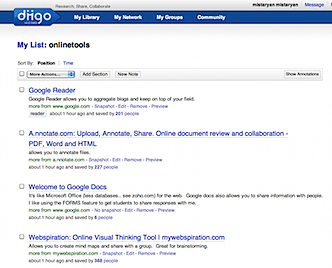
Diigo can show your URL's as a  list :


Screen shot 2010-04-23 at 2.50.18 AM.png


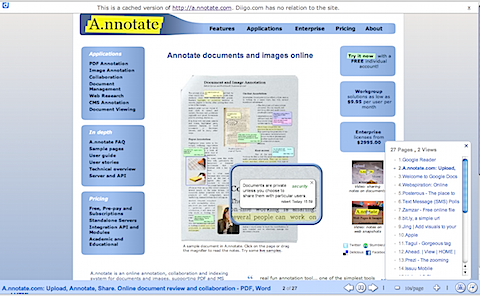
or as a slideshow:


Screen shot 2010-04-23 at 2.50.01 AM.png


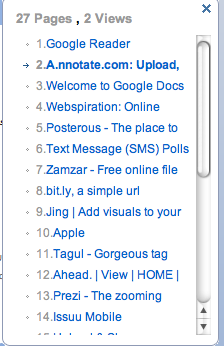
The show will rotate through each site (every 10 seconds), or you can click on the site you like.


Screen shot 2010-04-23 at 2.50.07 AM.png


Monday, April 5, 2010

Wetpaint WIki's in Plain English

I use Wetpaint when I use wiki's in the classroom.... here's a little video from Youtube:


Friday, April 2, 2010

Comic Life for Fliers

I really like Comic Life as a tool for making fliers. Here's a flier I made the this month's Technology of the Month at Montgomery College.


WIki's Technology of the Month

Thursday, April 1, 2010

Wiki's, March's Technology of the Month

Along with the Learning Technology Committee, the CTL will be offering workshops on the use of Wiki's in the Classroom this April. Register via PDS.


Wednesday April 14, 2010 12:00 pm to 1:00 pm - Online
Monday April 19, 2010 1:00 pm to 2:30 pm GT GT170
Thursday April 22, 2010 2:30 pm to 4:00 pm TP/SS RC211
Friday April 30, 2010 11:00 am to 12:00 pm - Online


[scribd id=29753560 key=key-tz29197xp0nlyl1xa0b mode=list]


Monday, March 29, 2010

The Technology in the Learning Space Initiative

WHen I first started at the Center for Teaching and Learning at Montgomery College I was asked to lead an initiative to enhance the use of technology in the classroom. In the fall version of our newsletter, I wrote about what my dream technology education program would look like.


Here's the entry:

Montgomery College Center for Teaching and Learning October 2009


Friday, March 26, 2010

Tuesday, March 23, 2010

Sunday, March 21, 2010

Fellowship Flyer

Application Deadline: Applications must be submitted online and received by March 1, 2010 at 5:00 PM


Workshop Dates and Time: May 24-28 , 2010 and June 2nd or 3rd , 9:00AM-3:30 PM


Workshop Location: TP/SS, ST 302


Kapp Notes: Are you sure it's a training need?

Kapp Notes: Are you sure it's a training need?

A Needs Analysis is needed because not all requests by managers or others for "training" are really going to be solved by training. Here is a list of some needs that are sometimes mistaken for training needs.


  • Performance Need—Employees are not performing in the proper manner or using inappropriate methods to accomplish goals. The performance is less than optimal because it is easier to do it another way or there is no consequence for poor performance. For example, an operations manager is not handling personnel issues correctly because he or she doesn't like conflict. (the person knows what is acceptable performance but chooses not to do it.). In this case training the person on conflict resolution is not the answer.

  • Organizational Need—The organization is lacking in some capacity or process and is unable to perform or to meet the expectations of its customers. For example, an organization is not able to offer its customers a desired service or offering. You can train people as much as you want but at some point you simply "can't do more with less."

  • Administrative Need—The process for following proper administrative procedures is not followed or is followed incompletely. The tracking and monitoring of administrative tasks is not performed at a satisfactory level. For example, customer warrantee information is not tracked properly. Again, the issue may be the administrative process itself.

  • Technical Need—An organization needs some type of technology to properly perform its obligation to customers or to create additional value for customers. For example, not having a customer-only section of a web site function properly.
  • Financial Need—Funding for desired initiatives does not exist or is scarce. For example, money necessary to purchase servers to house e-learning is not available.

  • Competitive Need—Rival organizations offer something your organization does not. For example, they have a high level of customer service and your organization does not.

  • Marketing Need—Initiatives are undertaken but members are unaware of what is available. For example, new e-learning modules are placed onto the web site but no one is aware of their availability.
__

Friday, March 19, 2010

CTL Professional Development Series II: Teaching Our Digital Natives, May 1

The Center for Teaching and Learning's second Professional Development Series for the 2009-2010 academic year has been rescheduled for May 1, at the Germantown Campus, Goldenrod Building, from 8:30 a.m. - 1 p.m. This event will offer part time faculty five professional development credit hours that can be used to increase rank and/or salary and full time faculty the opportunity to meet their professional development goals as well.

Teaching Our Digital Natives will focus on tools that can facilitate instruction. Many of the workshops are hands on or interactive. Learn about and how to use Smart Instructor Work Stations, Library Technology Resources, Banner for faculty, Web 2.0 tools, and much more.


These offerings are sure to enhance your instruction and support our mission to support students' success and change students' lives.


For more information, contact Professor Windy Jefferson-Jackson at windy.jefferson-jackson@montgomerycollege.edu or 240-567-1383.


To request accommodations for a disability, please contact June Clarke, CTL, at 240-567-2001.


Tuesday, March 9, 2010

Top Internet Tools for the Classroom

Ahhhh, my first foray into television. We did the shoot with two cameras, but I didn't really put in the proper pre-planning to make sure my presentation worked well.


Be kind:


Monday, March 1, 2010

One-to-one computing programs only as effective as their teachers

From http://www.eschoolnews.com/2010/02/16/11-programs-only-as-good-as-their-teachers/


Experts say 1-to-1 computing research needs to focus more on classroom practices—and less on equipment


A compilation of four new studies of one-to-one computing projects in K-12 schools identifies several factors that are key to the projects’ success, including adequate planning, stakeholder buy-in, and strong school or district leadership. Not surprisingly, the researchers say the most important factor of all is the teaching practices of instructors—suggesting school laptop programs are only as effective as the teachers who apply them.


The studies were published in January by theJournal of Technology, Learning, and Assessment, a peer-reviewed online journal from Boston College’s Lynch School of Education.


More...


Friday, February 26, 2010

Introducing Ahead.com...more non-linear presentations

So I thought Prezi was the greatest, But then I learn about Ahead.com . I haven't been able to play with it yet, but it looks interesting... below is an example (not mine though).


There was an error loading this section.

Click here to try again


  • News


  • Images


  • Videos


  • Profiles


  • The web


Thursday, February 25, 2010

Google Podcast

http://podcast.montgomerycollege.edu/podcast.php?podcast_unique_id=d7b9259e-4527-5ec4-6d01-aac8597afeac


Wednesday, February 24, 2010

Teacher vs Learner Centered Learning

I'm typically the person in the room who uses words that end with '-centric', ego-centric & exo-centric are personal faves as well as user-centric. In the blended learning fellowship, I am often caught talking about learner-centric activities.


I often think that most educators 'teach they way they were taught'. When transitioning to an online setting, this is academic suicide. We must take the view of the learner when creating lectures, designing activities, and developing assessments.


Some of the literature uses the word "connectedness" to describe the paradigm shift away from teacher-centered instruction.


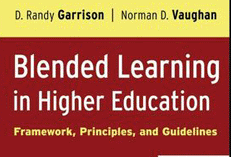
Screen shot 2010-04-23 at 12.38.57 PM.png One of the reason we chose the book "Blended Learning in Higher Education" was to highlight the need for community and connectivity in an online environment.


More than a technology book, it delves into issues of pedagogy in the online classroom and provides a 3 point framework to follow called the "Community of Inquiry". [view PPT]


While not covered in the book, the term 'blended learning' does not embody the 'learner-centric' paradigm...it's teacher-centric:) I won't argue against it, but food for thought.


Taken from the publisher's website, the book has the following main areas:


  • Outlines seven blended learning redesign principles


  • Explains the professional development issues essential to the implementation of blended learning designs


  • Presents six illustrative scenarios of blended learning design


  • Contains practical guidelines to blended learning redesign


  • Describes techniques and tools for engaging students

From all accounts, fellows did find the book helpful. Moreover, they agreed that building a course in a blended manner was a great way to redesign their course; allowing for new ideas to be implemented into an existing curriculum.

Here;a another nice article on the paradigm shift from instructional vs. learning paradigm.

A Classroom in your Pocket: iPods in Education

Another cool Slideshare Embed


Tuesday, February 23, 2010

Screencasts are your friend

Screencasts give you an opportunity to share your screen with audio. While expensive products like Camtasia will sell you bells and whistles you really don't need, quite a few free tools exist which do the job just fine.

I use screencasts in my teaching and training to provide an easy way to follow step-wise tasks and procedures, review online quizzes and summarize assignments. [Sample 1 | Sample 2]


I've used a bunch of tools but I really like the following:


Jing: Passively sits on your desktop and then records anything you want. It even keeps an online archive and allows you to save files online, to FLV or will even provide a SWF. (Available for both Mac and WIndows)


Screenflow: I like ScreenFlow over Camtasia since Screenflow is made ONLY for a Mac. It also has some automation features which make screencast creation a bit easier to accomplish.

Screenr: An online tool (no software needed) that will allow you to create screencasts from any computer.


Thursday, February 18, 2010

Using Timelines in the Classroom

I've used timelines for effect in class, but I'm trying to take it a step further this year. For my Introduction to HIp-Hop Studies class, I am using a service from timerime.com to keep a running timeline on events/people we cover in class. I'm thinking of having the students collaborate at some point, but I'm not sure about that aspect yet.


[Sometimes this code doesn't load... here's the link]


I chose timerime over another service called Dipity ... I like the features on dipity better, but I think the navigation and ease of use of timerime are better for the students. If I were dealing with grad students in a technology enhanced course, (undergrads even) I'd choose Dipity. I've learned to tailor the technology to your audience, not the author/creator.


Below is a dipity screenshot.

Screen shot 2010-02-15 at 6.54.55 PM.png


... loading ...


  • News


  • Images


  • Videos


  • Profiles


  • The web


The Advent Of Mobile Learning Technology

I think everyone knows about Slideshare, it's usually my first stop before starting on a new presentation. The two spaces I am really excited in terms of education technology are mobile learning and virtual learning. Here's a nice presentation via Slideshare on the former. ENJOY.The Advent Of Mobile Learning Technology


View more presentations from Upside Learning.


There was an error loading this section.

Click here to try again


  • News


  • Images


  • Videos


  • Profiles


  • The web


Tuesday, February 16, 2010

Articulate Engage

Sometimes I wish I had a reliable Windows box. I've learned to live without several apps that aren't available for Mac OS X. Articulate Engage is one of those tools. I am heavy into 'learning interactions' , short learning modules which cover a specific goal/objective.


I truly believe the next generation of successful pedagogues will be able to create content as well as deliver it in the classroom. I'm hoping a localized curriculum, one which students can readily identify with (culturally, geographically, spatially . . . to name a few), can assist in the learning process.


Below is an Articulate interaction I created to go along with a fellowship I was facilitating on Blended Learning.


Picture 13.png


Friday, February 12, 2010

The Role(s) of Teachers in Hybrid Learning Environments

From http://synthesizingeducation.com/


Perhaps the biggest problem with advancing online education and people’s attitudes towards online education is a result of their prior knowledge. Please understand that online education of the past will be replaced with a form of hybrid learning that integrates the positives of the physical world and the virtual world. That’s why it is imperative that districts and educators who advocate this new model of schooling are crystal clear as to what it looks like and how it will be different from our traditional perception of “online education”.


MORE...


Slides AT Diigo

So Diigo allows to to create a recorded movie of pre-selected websites. It's kinda funky at first, but you eventually get the hang of it. Mine is only OK, I'll eventually add some links of others of better quality.

To get started, you need to visit Diigo.com to create an account. It's similar to the other social bookmarking sites like Digg or Del.icio.us where you can download plug-ins to capture the URL's you want to track.

Diigo allows you to create lists of URLs which group your websites by topic. So consider a list of 15 websites on Web 2.0. When complete, you can go to Diigo which creates a running movie file of your websites.

Diigo downloads the newest version of the webpage on each load, so users see the page in real-time. What I liked most is the ability to narrate the slideshow movie and even control how long each page will stay on the screen (the default is 10 seconds).


Below is my maiden voyage of Diigo. I'm going to use it in the Spring semester.