Showing posts with label technology. Show all posts

Wednesday, May 26, 2010

Methods for Blended Learning

Margaret Driscoll of IBM write a great article on examples of various methods for blended learning:


Here's the list, see the article for details:


1. Put the assessment online.


2. Follow up with a community of practice.


3. Make reference materials available.


4. Deliver pre-work online.


5. Provide online office hours.


6. Use mentoring/coaching as a tool.


7. Provide job-aids.


8. Access experts.


9. Create a "lifeline".


10. Maximize e-mail and messaging.


I always say that if you teach online the same way you teach face-to-face, then you're not really teaching online. How does your style change when you tech online.



Monday, May 24, 2010

Mac Applications for Educators

Dru Ryan presented this to a group of educators at the LEAGUE conference in Baltimore. There were about 50 MAc enthusiasts in the room and the topic was well received.

Mac Applications for Educators


View more presentations from druryan.


Tuesday, May 18, 2010

Google Reader .. a screencast

A little screencast I made for Google reader. I learned that zooming is important after this one.


Thursday, May 6, 2010

Unified Learning and Collaboration:

Meeting the Needs of Education and Training in the 21st Century

Elluminate, though pushing its ware's in the process, provides an interesting paradigm for online learning.


http://www.elluminate.com/Products/Unified_Learning/?id=305/ Screen shot 2010-04-20 at 2.39.09 PM.png


Wednesday, April 7, 2010

Online Tools for Educators -- and a Diigo demo

I was asked by a faculty member to create a list of online tools [view as list or slideshow] I use in the classroom. It was hard because I go back and forth with some tools, like mindmeister, that didn't make the list, versus mywebspiration, which did. Or for timelines, dipity versus timerime (not on the list).


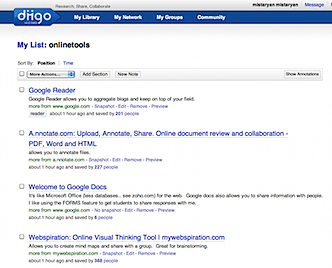
Diigo can show your URL's as a  list :


Screen shot 2010-04-23 at 2.50.18 AM.png


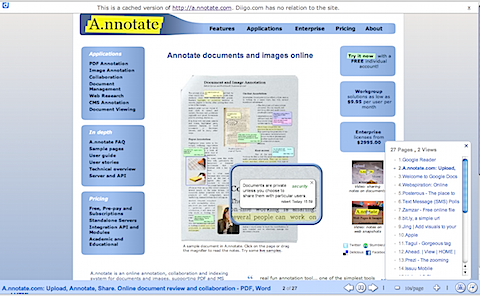
or as a slideshow:


Screen shot 2010-04-23 at 2.50.01 AM.png


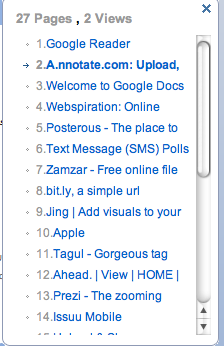
The show will rotate through each site (every 10 seconds), or you can click on the site you like.


Screen shot 2010-04-23 at 2.50.07 AM.png


Monday, April 5, 2010

Wetpaint WIki's in Plain English

I use Wetpaint when I use wiki's in the classroom.... here's a little video from Youtube:


Tuesday, March 23, 2010

Tuesday, March 9, 2010

Top Internet Tools for the Classroom

Ahhhh, my first foray into television. We did the shoot with two cameras, but I didn't really put in the proper pre-planning to make sure my presentation worked well.


Be kind:


Friday, February 26, 2010

Introducing Ahead.com...more non-linear presentations

So I thought Prezi was the greatest, But then I learn about Ahead.com . I haven't been able to play with it yet, but it looks interesting... below is an example (not mine though).


There was an error loading this section.

Click here to try again


  • News


  • Images


  • Videos


  • Profiles


  • The web


Tuesday, February 23, 2010

Screencasts are your friend

Screencasts give you an opportunity to share your screen with audio. While expensive products like Camtasia will sell you bells and whistles you really don't need, quite a few free tools exist which do the job just fine.

I use screencasts in my teaching and training to provide an easy way to follow step-wise tasks and procedures, review online quizzes and summarize assignments. [Sample 1 | Sample 2]


I've used a bunch of tools but I really like the following:


Jing: Passively sits on your desktop and then records anything you want. It even keeps an online archive and allows you to save files online, to FLV or will even provide a SWF. (Available for both Mac and WIndows)


Screenflow: I like ScreenFlow over Camtasia since Screenflow is made ONLY for a Mac. It also has some automation features which make screencast creation a bit easier to accomplish.

Screenr: An online tool (no software needed) that will allow you to create screencasts from any computer.


Thursday, February 18, 2010

The Advent Of Mobile Learning Technology

I think everyone knows about Slideshare, it's usually my first stop before starting on a new presentation. The two spaces I am really excited in terms of education technology are mobile learning and virtual learning. Here's a nice presentation via Slideshare on the former. ENJOY.The Advent Of Mobile Learning Technology


View more presentations from Upside Learning.


There was an error loading this section.

Click here to try again


  • News


  • Images


  • Videos


  • Profiles


  • The web


Friday, February 12, 2010

The Role(s) of Teachers in Hybrid Learning Environments

From http://synthesizingeducation.com/


Perhaps the biggest problem with advancing online education and people’s attitudes towards online education is a result of their prior knowledge. Please understand that online education of the past will be replaced with a form of hybrid learning that integrates the positives of the physical world and the virtual world. That’s why it is imperative that districts and educators who advocate this new model of schooling are crystal clear as to what it looks like and how it will be different from our traditional perception of “online education”.


MORE...


Slides AT Diigo

So Diigo allows to to create a recorded movie of pre-selected websites. It's kinda funky at first, but you eventually get the hang of it. Mine is only OK, I'll eventually add some links of others of better quality.

To get started, you need to visit Diigo.com to create an account. It's similar to the other social bookmarking sites like Digg or Del.icio.us where you can download plug-ins to capture the URL's you want to track.

Diigo allows you to create lists of URLs which group your websites by topic. So consider a list of 15 websites on Web 2.0. When complete, you can go to Diigo which creates a running movie file of your websites.

Diigo downloads the newest version of the webpage on each load, so users see the page in real-time. What I liked most is the ability to narrate the slideshow movie and even control how long each page will stay on the screen (the default is 10 seconds).


Below is my maiden voyage of Diigo. I'm going to use it in the Spring semester.


Thursday, January 14, 2010

Useful Internet Tools for the Classroom

The following video was done for the Montgomery College TV station...


Here's the handout:

Useful Internet Applications for the Classroom


Wednesday, December 2, 2009

Teachinology in the Learning Space Initiative

For the last year, I've been leading an effort called the Technology in the Learning Space Initiative. Here's an article I wrote for our newsletter on it.

Montgomery College Center for Teaching and Learning October 2009