
So I thought Prezi was the greatest, But then I learn about Ahead.com . I haven't been able to play with it yet, but it looks interesting... below is an example (not mine though).
Friday, February 26, 2010


Thursday, February 25, 2010
Google Podcast
http://podcast.montgomerycollege.edu/podcast.php?podcast_unique_id=d7b9259e-4527-5ec4-6d01-aac8597afeac
Wednesday, February 24, 2010
Teacher vs Learner Centered Learning
I'm typically the person in the room who uses words that end with '-centric', ego-centric & exo-centric are personal faves as well as user-centric. In the blended learning fellowship, I am often caught talking about learner-centric activities.
I often think that most educators 'teach they way they were taught'. When transitioning to an online setting, this is academic suicide. We must take the view of the learner when creating lectures, designing activities, and developing assessments.
Some of the literature uses the word "connectedness" to describe the paradigm shift away from teacher-centered instruction.
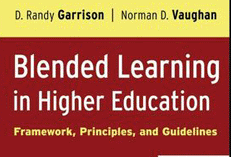 One of the reason we chose the book "Blended Learning in Higher Education" was to highlight the need for community and connectivity in an online environment.
More than a technology book, it delves into issues of pedagogy in the online classroom and provides a 3 point framework to follow called the "Community of Inquiry". [view PPT]
While not covered in the book, the term 'blended learning' does not embody the 'learner-centric' paradigm...it's teacher-centric:) I won't argue against it, but food for thought.
Taken from the publisher's website, the book has the following main areas:
- Outlines seven blended learning redesign principles
- Explains the professional development issues essential to the implementation of blended learning designs
- Presents six illustrative scenarios of blended learning design
- Contains practical guidelines to blended learning redesign
- Describes techniques and tools for engaging students
Here;a another nice article on the paradigm shift from instructional vs. learning paradigm.
Tuesday, February 23, 2010
Screencasts are your friend
Screencasts give you an opportunity to share your screen with audio. While expensive products like Camtasia will sell you bells and whistles you really don't need, quite a few free tools exist which do the job just fine.
I use screencasts in my teaching and training to provide an easy way to follow step-wise tasks and procedures, review online quizzes and summarize assignments. [Sample 1 | Sample 2]I've used a bunch of tools but I really like the following:
Jing: Passively sits on your desktop and then records anything you want. It even keeps an online archive and allows you to save files online, to FLV or will even provide a SWF. (Available for both Mac and WIndows)
Screenflow: I like ScreenFlow over Camtasia since Screenflow is made ONLY for a Mac. It also has some automation features which make screencast creation a bit easier to accomplish.
Screenr: An online tool (no software needed) that will allow you to create screencasts from any computer.Thursday, February 18, 2010
Using Timelines in the Classroom
I've used timelines for effect in class, but I'm trying to take it a step further this year. For my Introduction to HIp-Hop Studies class, I am using a service from timerime.com to keep a running timeline on events/people we cover in class. I'm thinking of having the students collaborate at some point, but I'm not sure about that aspect yet.
[Sometimes this code doesn't load... here's the link]
I chose timerime over another service called Dipity ... I like the features on dipity better, but I think the navigation and ease of use of timerime are better for the students. If I were dealing with grad students in a technology enhanced course, (undergrads even) I'd choose Dipity. I've learned to tailor the technology to your audience, not the author/creator.
Below is a dipity screenshot.
The Advent Of Mobile Learning Technology
I think everyone knows about Slideshare, it's usually my first stop before starting on a new presentation. The two spaces I am really excited in terms of education technology are mobile learning and virtual learning. Here's a nice presentation via Slideshare on the former. ENJOY.The Advent Of Mobile Learning Technology
View more presentations from Upside Learning.
View more presentations from Upside Learning.
Tuesday, February 16, 2010
Articulate Engage
Sometimes I wish I had a reliable Windows box. I've learned to live without several apps that aren't available for Mac OS X. Articulate Engage is one of those tools. I am heavy into 'learning interactions' , short learning modules which cover a specific goal/objective.
I truly believe the next generation of successful pedagogues will be able to create content as well as deliver it in the classroom. I'm hoping a localized curriculum, one which students can readily identify with (culturally, geographically, spatially . . . to name a few), can assist in the learning process.
Below is an Articulate interaction I created to go along with a fellowship I was facilitating on Blended Learning.

Friday, February 12, 2010
The Role(s) of Teachers in Hybrid Learning Environments
From http://synthesizingeducation.com/
Perhaps the biggest problem with advancing online education and people’s attitudes towards online education is a result of their prior knowledge. Please understand that online education of the past will be replaced with a form of hybrid learning that integrates the positives of the physical world and the virtual world. That’s why it is imperative that districts and educators who advocate this new model of schooling are crystal clear as to what it looks like and how it will be different from our traditional perception of “online education”.
Slides AT Diigo
So Diigo allows to to create a recorded movie of pre-selected websites. It's kinda funky at first, but you eventually get the hang of it. Mine is only OK, I'll eventually add some links of others of better quality.
To get started, you need to visit Diigo.com to create an account. It's similar to the other social bookmarking sites like Digg or Del.icio.us where you can download plug-ins to capture the URL's you want to track.
Diigo allows you to create lists of URLs which group your websites by topic. So consider a list of 15 websites on Web 2.0. When complete, you can go to Diigo which creates a running movie file of your websites.
Diigo downloads the newest version of the webpage on each load, so users see the page in real-time. What I liked most is the ability to narrate the slideshow movie and even control how long each page will stay on the screen (the default is 10 seconds).
Below is my maiden voyage of Diigo. I'm going to use it in the Spring semester.
Tuesday, February 9, 2010
Snowpacalypse
So the snow gave us a week off and hopefully a chance to work on the course designs:) I will let you know the make-up date for the Saturday session. I may end up recording it in Camtasia...we'll see.
Until then, please make sure you have at least one blog entry up for the week of 2/13. I'll be using the blogs as my primary means of one to one communication. Talk to you soon.
Don't know what Camtasia is? View my post . . . it's part of my Visual Communication workshop (the one that the snow postponed)
Sunday, February 7, 2010
Post-It Sheets in the Classroom
I HEART using post-it sheets in class. Matter of fact, I use Post-it notes too . . . but that's another blog entry. Especially when I taught the same course to multiple classes, it helped me minimize the amount of writing I did. It also allows you to keep concepts 'around' even when you move on to another topic.
The following slideshow is from my days as a middle school math teacher.
Wednesday, February 3, 2010
Using Gmail as Mass Online Storage / Sharing
An excellent way to use Google for storage.
http://themacschool.blogspot.com/2009/10/using-gmail-as-mass-online-storage.html
Subscribe to:
Comments (Atom)


 Posts
Posts

